Enterprise AI Agents: How to Build Them for Production
A practitioner's guide to taking enterprise AI agents from demo to production: scope, architecture, guardrails, evaluation, security and rollout.

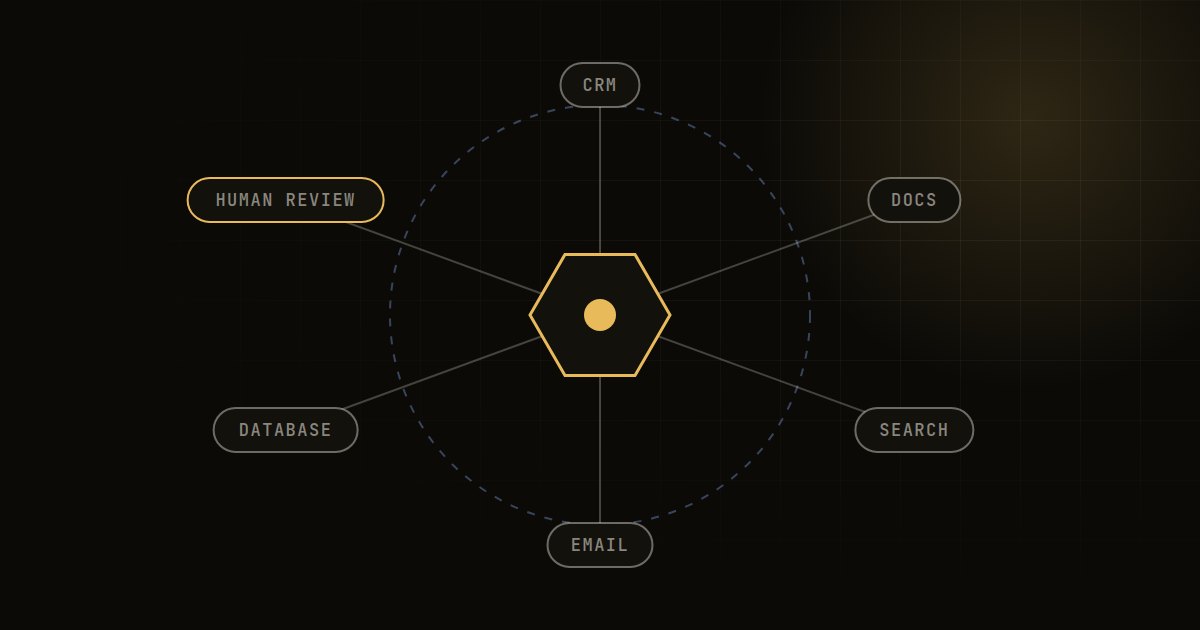
Enterprise AI agents are LLM-based systems that plan and take actions across business tools, such as looking up records, drafting responses or updating tickets, with defined limits on what they can do. Building them for production means narrow scope, well-designed tools, strict permissions, human approval for risky actions, rigorous evaluation and full observability from day one.
Building a convincing agent demo takes days. Building one that a bank, hospital or manufacturer can trust with real workflows takes a disciplined engineering approach. This guide covers the decisions that matter, in roughly the order you will face them.
What makes enterprise AI agents different from chatbots
A chatbot answers questions. An agent decides what to do next and does it: it calls APIs, queries databases, reads documents and writes back to systems. That shift from generating text to taking action changes the risk profile completely.
In an enterprise setting, agents also operate under constraints that consumer demos ignore: role-based access, audit requirements, data residency, integration with legacy systems, cost limits and the need for predictable behaviour across thousands of runs. Most of the engineering effort goes into those constraints, not the prompt.
Step 1: Choose the right first use case
Good first candidates share a few traits:
- The workflow is repetitive, rule-guided and currently handled by people switching between several systems.
- Outcomes are verifiable, so you can tell whether the agent did the right thing.
- Mistakes are recoverable, or the risky step can sit behind human approval.
- There is a clear business owner and a measurable baseline, such as handling time or backlog.
Typical scenarios that fit well include triaging and enriching support tickets, preparing first drafts of credit or claims summaries from documents, reconciling invoices against purchase orders, and gathering context for sales or account reviews. Poor first choices are open-ended "do anything" assistants, or workflows where one wrong action is costly and irreversible.
Step 2: Decide the level of autonomy
Not every agent needs to act on its own. Being explicit about autonomy is the single most useful design decision you will make.
| Level | What the agent does | Human role | Suitable for |
|---|---|---|---|
| 1. Assist | Retrieves information and drafts outputs | Reviews and acts on everything | Early deployments, regulated decisions |
| 2. Propose | Prepares actions ready to execute | Approves or edits each action | Updates to customer records, payments, communications |
| 3. Act with limits | Executes low-risk actions directly | Reviews exceptions and samples | Ticket routing, data enrichment, internal tasks |
| 4. Autonomous | Runs end-to-end workflows | Monitors metrics and audits | Mature, well-evaluated, low-risk processes |
Most production enterprise agents we see sensibly sit at levels 2 or 3. Move up a level only when evaluation data shows the agent is reliable at the current one.
Step 3: Design the architecture
A production agent is a system, not a prompt. The core components are consistent across most designs.
| Component | Purpose | Key decisions |
|---|---|---|
| Orchestrator | Runs the plan, act, observe loop | Single agent or multi-agent; graph or free-form planning; step limits |
| Model layer | Reasoning and generation | Which model per step; fallback models; routing by difficulty |
| Tools | Actions the agent can take | Narrow, typed, well-documented functions |
| Knowledge | Context from documents and data | RAG over policies and records, with permission filtering |
| Memory and state | Tracks progress within and across tasks | What to persist, for how long, and where |
| Guardrails | Enforce limits on inputs, outputs and actions | Validation, policy checks, approval gates |
| Observability | Traces, logs, metrics, cost | Full trace of every step and tool call |
Start with a single agent and a small set of tools. Multi-agent designs add coordination complexity and failure modes, so adopt them only when a single agent clearly cannot cope. For how agents use knowledge, see our comparison of RAG vs fine tuning.
Step 4: Design tools carefully
Tool design determines reliability more than model choice does. A few principles help:
- Keep tools narrow. "get_invoice_by_id" is safer and easier for the model to use correctly than a general "run_sql".
- Use strict schemas. Typed inputs, enumerated values and validation on every call. Reject malformed requests rather than guessing.
- Write descriptions for the model. Explain when to use each tool, what it returns and common mistakes to avoid.
- Return useful errors. Clear error messages let the agent recover; vague ones cause loops.
- Make write actions idempotent. Retries should not create duplicate records or payments.
- Separate read and write tools. It makes permissions and approval gates much simpler.
Step 5: Build guardrails and security in
Agents widen your attack surface because they read untrusted content and can act on it.
Least privilege
Each agent should run with its own service identity and the minimum permissions needed. Where possible, act on behalf of the requesting user so existing access controls apply.
Prompt injection
Documents, emails and web pages can contain instructions designed to hijack the agent. Treat all retrieved content as data, not instructions. Constrain which tools can be called after reading untrusted input, and require approval for sensitive actions regardless of what the model decides.
Action limits
Set hard limits outside the model: maximum steps per task, spending caps, rate limits and allow-lists of permitted actions. Do not rely on the prompt to enforce them.
Data handling
Decide what may be sent to external model providers, mask sensitive fields where possible and log in line with your retention policies. In regulated sectors, involve security and compliance teams at design time rather than at launch.
Step 6: Evaluate before and after launch
Agents need evaluation at two levels: the final outcome and each step along the way.
- Task success: did the agent reach the correct end state?
- Step quality: did it choose the right tools with the right arguments?
- Efficiency: how many steps, how much latency, what cost per task?
- Safety: did it stay within policy, and did it escalate when it should have?
Build a test set from real historical cases, including awkward edge cases. Run it on every change to prompts, tools or models. After launch, sample live runs for human review and feed failures back into the test set.
Step 7: Observe and operate
Every run should produce a full trace: inputs, retrieved context, model calls, tool calls, outputs and approvals. Without traces, debugging a misbehaving agent is guesswork.
Monitor task success rate, escalation rate, latency, error rate and cost per task on a dashboard the business owner can read. Agents also need the same operational discipline as any production system: CI/CD, staged releases, rollback, on-call support and incident response. If you do not have that capability in-house, a managed services arrangement covering SRE and support can fill the gap.
Step 8: Roll out in phases
- Shadow mode. The agent runs alongside people, and its outputs are compared but not used.
- Assisted mode. Staff use the agent's drafts and proposals, approving every action.
- Limited autonomy. Low-risk actions run automatically for a subset of cases, with sampling.
- Scale. Expand volume and scope as metrics hold steady.
At each gate, check the evaluation results with the business owner before moving on. This approach builds trust with users and gives you evidence for risk and compliance reviews.
Frequently asked questions
What are enterprise AI agents?
They are software systems that use large language models to plan and carry out multi-step tasks across business applications, such as retrieving data, drafting documents and updating records. Unlike chatbots, they take actions, so they need permissions, guardrails and auditing.
How are AI agents different from RPA?
RPA follows fixed, scripted steps and breaks when inputs vary. AI agents can interpret unstructured inputs and decide which steps to take, which makes them more flexible but less predictable. Many organisations combine them, using agents for judgement and RPA or APIs for deterministic execution.
Are AI agents safe for regulated industries?
They can be, with the right design: limited autonomy, human approval for consequential actions, least-privilege access, full audit trails and rigorous evaluation. Regulated organisations should involve compliance and risk teams from the start.
How long does it take to build an enterprise AI agent?
As a rough guide, a focused pilot on one workflow may take a few weeks to a couple of months. Production readiness takes longer, depending on integrations, security reviews and how much evaluation data exists.
Should we use a single agent or multiple agents?
Start with a single agent and a small, well-designed toolset. Multi-agent architectures help when tasks genuinely need distinct specialised roles, but they add coordination overhead and new failure modes.
How Sunday Labs can help
Sunday Labs builds GenAI applications and agents designed for production from the start, with the guardrails, evaluation and observability that enterprise teams need. Every engagement is personally led by our founder, and the engineering is done by senior people who have run critical systems at scale. If you have an agent pilot that needs to become something your business can rely on, start a conversation.